These are first-party internal productions, not customer campaigns. Each public source was edited into a structured storyboard, prepared with the same local project generator used by the product, and exported through the real cm-skills render command. Checkout, authenticated compose, device authorization and paid voice or music were not exercised in these cases.
Time and cost, with boundaries. The shared initial writing batch for all three sources, prompts and storyboards took 111 seconds (06:52:16–06:54:07 UTC). Prior investigation, measurement-script implementation, later revision and QA are excluded; individual authoring time was not measured. The environment was already installed, so first-install time is unmeasured. Each actual CLI render is timed below.
Paid API calls: US$0. Extra site rendering fee: US$0. The coding-agent plan, computer/electricity and staff time were not separately priced; this is not a zero-total-cost claim. Runs used the same Apple M5 machine with 16 GiB RAM and a cached HyperFrames 0.8.145 environment.
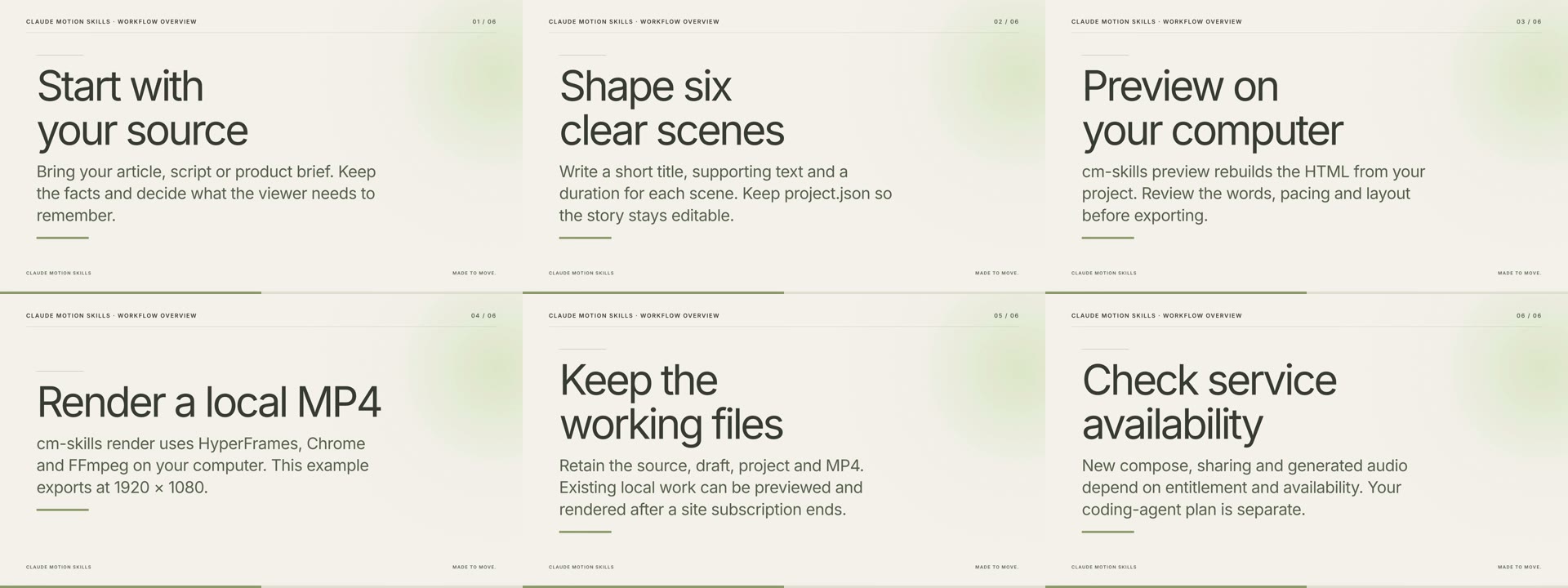
INTERNAL CASE · quiet-keynote
A 36-second product introduction
A text-led introduction to Claude Motion Skills: editable scenes, local previews and MP4 export.
For: Creators evaluating the local workflow · 16:9 · 6 scenes · Original local tone bed; no speech
The first draft put preview and export in one scene. The final draft gives each a separate six-second scene and replaces a purchase call to action with the account and service limits.
Text-led product introduction; no screenshot import, UI recording or product-image support is demonstrated.
The quiet original tone bed is synthesized locally with FFmpeg. It is not speech, AI music or a test of the paid audio service.
The render used an internally prepared local project, not an authenticated compose session. No new subscription flow was tested.
Actual render of this final MP4
Measured at (UTC)
2026-10-18 06:56:48
Output
36s · 1920 × 1080 · 30 fps
Frames / codec
1080 · H264 / MP4
Tools
cm-skills 1.0.0 · HyperFrames 0.8.145
File size
7,430,145 bytes
CLI render elapsed
47.198s
Audio tracks
1 · Original local tone bed; no speech
Full decode
Passed
Lint
1 errors / 7 warnings
Timing includes CLI startup, temporary project preparation and rendering. It excludes writing, audio synthesis and verification. One cached local run is not a speed guarantee; successful decoding does not imply strict-lint success.
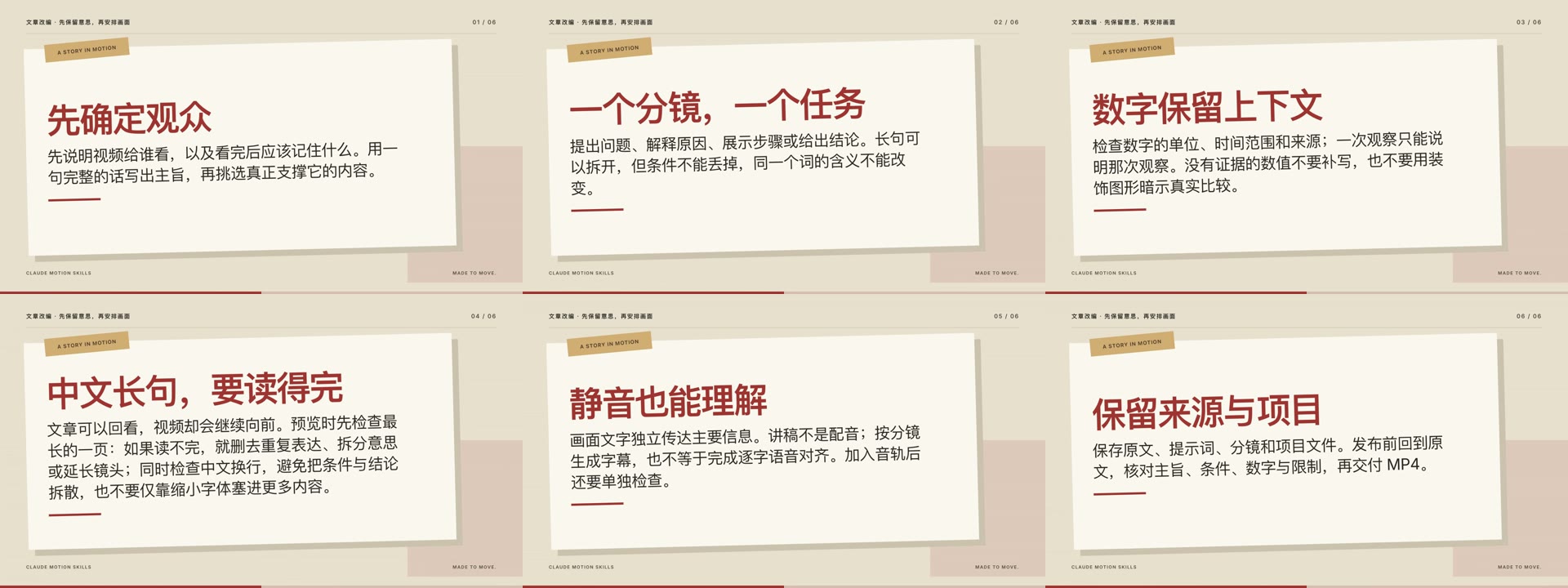
The initial draft used a single dense paragraph per scene. The final version adds short titles, preserves all six source sections and retains one deliberately longer Chinese paragraph for line-wrap review; no speech is generated.
Silent Chinese text explainer; narration notes are text, not generated speech.
Subtitles follow whole-scene intervals, not word-level speech alignment. Local font fallback can differ on another operating system.
The longer fourth scene is a deliberate layout stress sample; pause or use the transcript for comfortable reading.
The render used an internally prepared local project, not an authenticated compose session. No new subscription flow was tested.
Actual render of this final MP4
Measured at (UTC)
2026-10-18 06:57:32
Output
42s · 1920 × 1080 · 30 fps
Frames / codec
1260 · H264 / MP4
Tools
cm-skills 1.0.0 · HyperFrames 0.8.145
File size
4,653,150 bytes
CLI render elapsed
41.258s
Audio tracks
0 · Silent
Full decode
Passed
Lint
1 errors / 7 warnings
Timing includes CLI startup, temporary project preparation and rendering. It excludes writing, audio synthesis and verification. One cached local run is not a speed guarantee; successful decoding does not imply strict-lint success.
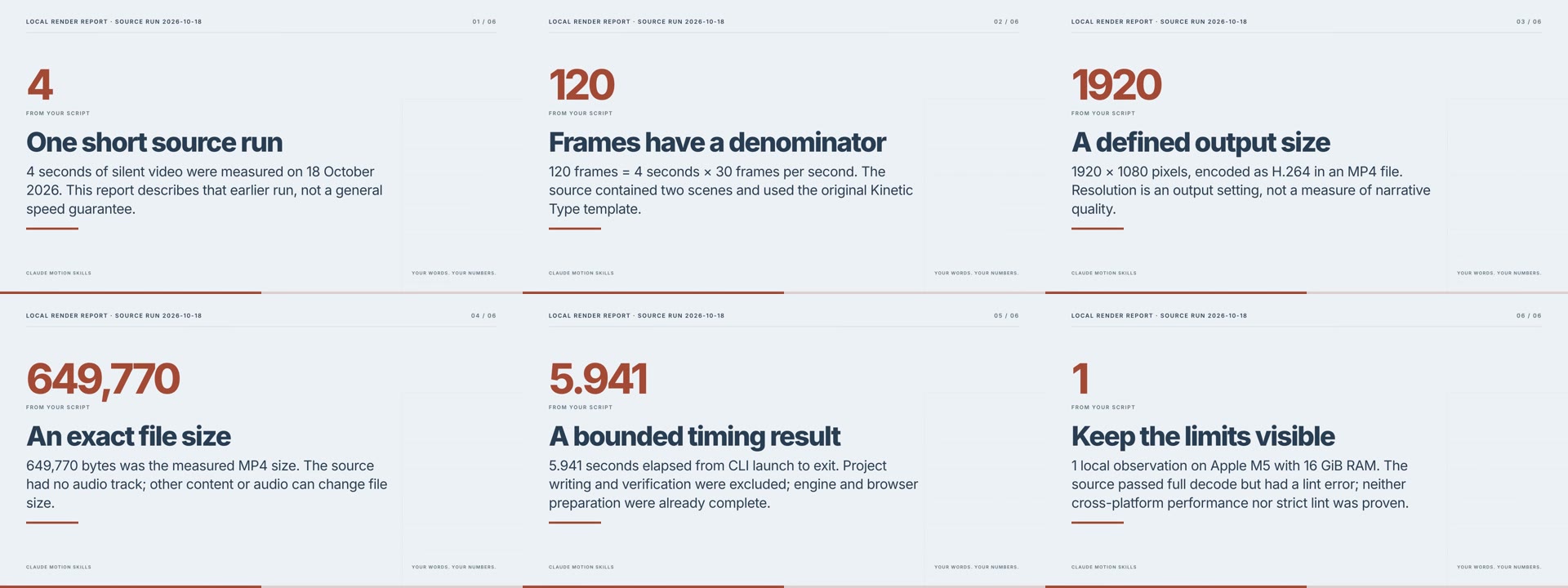
The first draft listed figures without context. The final version adds the measurement date, frame-count calculation, silent-audio condition and timing boundary. The bar-like decoration is not described as a data chart.
The supplied JSON records an earlier four-second run. The new explanatory video has its own separate render measurement below.
Data Story emphasizes literal figures from text. It does not import tables or generate a calibrated chart.
One machine and one cached environment do not establish a performance benchmark across operating systems.
The render used an internally prepared local project, not an authenticated compose session. No new subscription flow was tested.
Actual render of this final MP4
Measured at (UTC)
2026-10-18 06:58:05
Output
36s · 1920 × 1080 · 30 fps
Frames / codec
1080 · H264 / MP4
Tools
cm-skills 1.0.0 · HyperFrames 0.8.145
File size
3,652,946 bytes
CLI render elapsed
30.774s
Audio tracks
0 · Silent
Full decode
Passed
Lint
1 errors / 7 warnings
Timing includes CLI startup, temporary project preparation and rendering. It excludes writing, audio synthesis and verification. One cached local run is not a speed guarantee; successful decoding does not imply strict-lint success.
4 seconds of silent video were measured on 18 October 2026. This report describes that earlier run, not a general speed guarantee.
6–12s · Frames have a denominator
120 frames = 4 seconds × 30 frames per second. The source contained two scenes and used the original Kinetic Type template.
12–18s · A defined output size
1920 × 1080 pixels, encoded as H.264 in an MP4 file. Resolution is an output setting, not a measure of narrative quality.
18–24s · An exact file size
649,770 bytes was the measured MP4 size. The source had no audio track; other content or audio can change file size.
24–30s · A bounded timing result
5.941 seconds elapsed from CLI launch to exit. Project writing and verification were excluded; engine and browser preparation were already complete.
30–36s · Keep the limits visible
1 local observation on Apple M5 with 16 GiB RAM. The source passed full decode but had a lint error; neither cross-platform performance nor strict lint was proven.
A useful motion graphics example shows more than a polished frame: it lets you see what moves, read the source text and understand how to change it. These four examples are original compositions from this site. Each has a working browser preview on its public style-detail page. The original starter templates are MIT licensed; obtaining a protected starter kit still requires account access. They are template demonstrations, not customer campaigns or evidence of a third-party product's results.
The previews use synthetic demonstration copy and a shared opening idea, with each style’s description identifying its intended use. This makes the hierarchy and layout easy to compare without introducing customer claims. Open more than one preview and compare how the title, supporting copy, accent and progress treatment affect the reading experience. The linked previews are browser compositions; use local rendering when you need a distributable MP4.
ORIGINAL MIT STARTER
Kinetic Type
Preview uses the same renderer as your exported HTML.
Large lime headings on a dark field. A direct treatment for short statements and memorable hooks.
Example 1: emphasize a short message with Kinetic Type
Kinetic Type places the headline at the center of the composition. Uppercase lettering, a dark background and lime accents give short statements a clear hierarchy. It fits a practical tip, a product positioning line or a chapter opener where the words themselves carry the idea. Start with a hook, give the viewer one useful explanation, and end with one action.
The design works best when each scene has a distinct job. If a scene needs a dense paragraph, cut it into smaller thoughts instead of shrinking every line. Preview at phone size before deciding the type is readable. The kinetic typography guide explains pacing and compares this approach with the neighboring styles.
Example 2: make an editorial story with Paper Collage
Paper Collage uses a warm paper surface and inset cards to suggest an editorial page. Its serif lettering and offset layers give an explanatory paragraph a different mood from the Kinetic Type sample, while preserving a clear headline and supporting-text hierarchy. Try it for an essay excerpt, a reading recommendation or a short introduction to an idea.
Give the narration a beginning, a change and a resolution. For example, a museum announcement might introduce an exhibit, identify one object to notice and end with visiting information. Replace all placeholder facts with verified details. The paper styling does not require scanned book pages or copyrighted artwork; the starter's visual treatment is built in its own HTML and CSS.
Example 3: explain a process with Quiet Keynote
Quiet Keynote uses softer color and more restrained emphasis. It suits material that needs a little thinking time: a process, a lesson recap or a product walkthrough introduction. The goal is to make the next sentence easy to follow. A useful sequence names the problem, explains one decision and shows what the viewer should do next.
For spoken presentations, separate the text that belongs on screen from the explanation in your notes. A video requires planned scene durations; a presentation may instead be advanced by its presenter. If your actual deliverable is a browser deck, compare the HTML slides workflow before turning every sentence into a timed scene.
Example 4: present a supported figure with Data Story
Data Story emphasizes figures found in your script. It is appropriate for a verified result, a budget explanation or a small number of clearly labeled milestones. Start by recording what each figure means, its unit, the relevant period and its source. A number can be correct yet misleading when its denominator or comparison is missing.
The starter's decorative bars are a graphic motif, not a chart with a calibrated quantitative scale. Do not describe them as a measured trend. When a story needs a real comparison, ask your agent for an explicitly labeled chart based on supplied data, then check the visual against that data. Keep the citation visible in the scene or in the accompanying publication.
How to evaluate a motion example before adapting it
Choose an example for its reading behavior, not just its color. Watch the opening once without pausing and write down what you remember. Then replay it while checking the longest line, the shortest scene and the final instruction. If important words leave before you can read them, simplify the text or extend the timing. Review a muted playback too; many distribution contexts begin without audio.
Choose the matching style in the getting-started flow. If you obtain an authorized source kit, keep an unchanged copy. Replace the script, adjust the format and revise the scene structure before applying your brand colors. Use the four-step CLI tutorial for supported commands. If starting from a slide deck, the PPT-to-video guide explains how to reconstruct its content without promising automatic native PowerPoint conversion.
Original examples and external inspiration
The four compositions above were implemented by Claude Motion Skills and are covered by this site's original-template license. HyperFrames is the separately maintained open-source engine used for local rendering. Those are different roles: the renderer's authorship does not make these template examples official HeyGen or Anthropic product demos.
For a broader look at public work, see five sourced Claude Motion toolkit and HyperFrames videos. That article identifies each creator and links to the original publication. Use external work to study pacing or explain a technique; keep its attribution and do not present another creator's footage as your own customer result.
Sources and review notes
Written by Claude Motion Skills. Reviewed October 11, 2026. Product instructions are checked against this site's implementation; external documentation is identified separately.
Start with a public style preview, then compare site plans and current availability when you need account-gated features. The style index helps you explore other treatments after you have a clear script.